
UDP vs MQTT vs HTTP for GPS Trackers: Bytes on the Wire, Battery and Reliability
Published: | Category: Engineering
If you are choosing between UDP vs MQTT vs HTTP for IoT, the honest answer is that there is no single best protocol for a GPS tracker. It depends on how often the device reports, how much it can afford to lose, whether it must receive commands, and what sits between it and your server. This post is for firmware and platform engineers who need to make that call with numbers rather than opinions.
We took one 12-byte position reading, built the exact message for each protocol, and counted the bytes. AdaTrack supports signed UDP, MQTT and Codec8/Queclink TCP, so we have no reason to push you toward any one of them. The verdict is at the end of each section and summarised in the last one.
What exactly are we comparing?
The reading is the 12-byte payload used in the AdaTrack firmware hub: temperature (int16), battery percent (uint8), latitude and longitude as int32 scaled by 1e6, and RSSI (int8), all big-endian. The hex is 09f65702deb07601050b24b9. We built every message below in a Python script and counted the lengths, instead of estimating them.
One caveat up front: AdaTrack's device ingestion paths are UDP, MQTT and the Codec8/Queclink TCP plugins. The HTTP column is a comparison against what a generic HTTP endpoint would cost, not a documented AdaTrack ingestion path.
How many bytes does a signed UDP position fix cost?
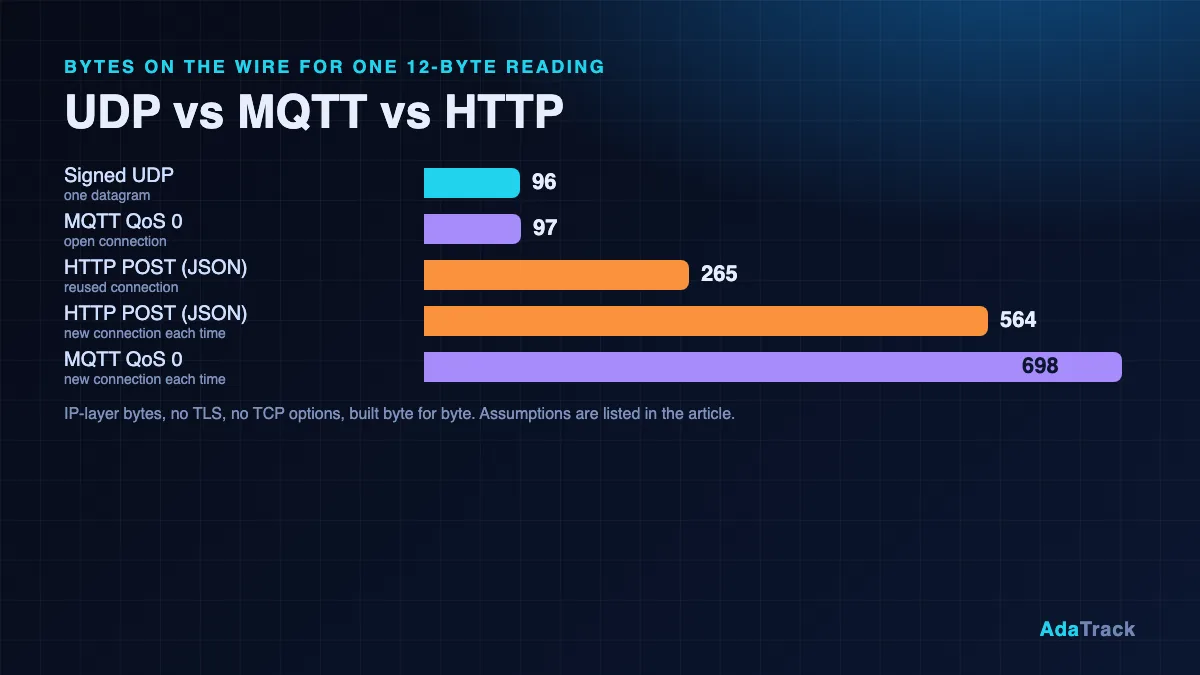
An AdaTrack datagram is a 16-byte device ID, an 8-byte big-endian timestamp, the payload, and a 32-byte raw HMAC-SHA256 signature. With a 12-byte payload that is 68 bytes of application data. Add an 8-byte UDP header and a 20-byte IPv4 header and you get 96 bytes on the wire. There is no handshake, no teardown, and no acknowledgement in either direction, so a new connection costs exactly the same as a repeat one: 96 bytes.
Note that the signature and device ID account for 56 of those 68 bytes. Authentication is per packet, which is what makes the transport stateless, as covered in Securing IoT Devices: HMAC and Replay Protection.
What does the same reading cost over MQTT 3.1.1?
An MQTT QoS 0 PUBLISH has a 1-byte fixed header, a 1-byte remaining length (the packet is under 128 bytes), a 2-byte topic length, the topic, and the payload. AdaTrack's uplink topic is data/{device_id}, which is 41 characters with a UUID, so the PUBLISH is 1 + 1 + 2 + 41 + 12 = 57 bytes. With a one-character topic it would be 17 bytes, but AdaTrack's per-device topic isolation uses the UUID topic. Over an already-open connection, add 40 bytes of TCP and IPv4 headers and the reading costs 97 bytes, one byte more than the UDP datagram. If the server sends a separate pure TCP ACK, add another 40 bytes for 137 bytes; often the ACK is delayed or piggybacked and costs nothing extra.
MQTT has no per-message signature here: authentication happens once per connection with the device UUID and secret, as described in the MQTT documentation. That is why the steady-state message is so small.
The cost is in the connection. A client that connects, publishes once and disconnects pays for a TCP handshake (3 segments), a 155-byte CONNECT (with the 36-character UUID as client ID and username and a 64-character secret), a 4-byte CONNACK, the PUBLISH, a 2-byte DISCONNECT and a four-segment TCP close. Counted at 40 bytes of header per segment, that is 698 bytes for a single reading. Subscribing to the command topic adds 52 bytes of SUBSCRIBE and 5 bytes of SUBACK plus headers, bringing it to 835 bytes. Staying connected avoids this but adds keepalive traffic: a PINGREQ and PINGRESP pair is 84 bytes with headers.
What does a plain HTTP/1.1 POST cost?
We built a minimal request: POST /d HTTP/1.1, Host, Content-Type and Content-Length headers, and a compact JSON body of 60 bytes for the same fields. The request is 158 bytes and a bare 204 No Content response is 27 bytes. On a reused keep-alive connection that is 265 bytes including TCP/IP headers. With a fresh connection per reading (handshake, Connection: close, teardown) it is 564 bytes. If you send the 12 raw bytes as application/octet-stream instead of JSON, those become 225 and 524 bytes. The headers, not the body, dominate.
This is plain HTTP without TLS. A TLS handshake on each new connection would add substantially more, but we have not measured it for this post, so we give no figure.
Bytes per reading: the full comparison
| Protocol | Application bytes | Reused connection (bytes on the wire) | New connection per reading (bytes on the wire) |
|---|---|---|---|
| AdaTrack UDP (signed) | 68 | 96 | 96 |
MQTT 3.1.1 QoS 0, data/{uuid} topic | 57 | 97 (137 with a separate ACK) | 698 (835 with SUBSCRIBE) |
| HTTP/1.1 POST, JSON body | 158 request + 27 response | 265 | 564 |
| HTTP/1.1 POST, 12-byte binary body | 118 request + 27 response | 225 | 524 |
Assumptions.
- Counts are at the IP layer. TCP segments carry 20 bytes of TCP header and 20 bytes of IPv4 header; TCP options (timestamps, MSS, window scale) are ignored, so real SYN segments are larger. UDP uses 8 + 20 bytes.
- Cellular link-layer overhead, radio signalling and retransmissions are not included.
- MQTT uses a 36-character UUID as client ID and username and a 64-character secret as password, QoS 0, keepalive field set to 60 s, and the 41-character
data/{uuid}topic. - MQTT "new connection" is: SYN, SYN-ACK, ACK, CONNECT, CONNACK, PUBLISH, one pure ACK, DISCONNECT, then FIN, ACK, FIN, ACK. Twelve segments, 40 bytes of header each.
- HTTP responses are a bare
204 No Contentwith no headers; real servers usually add aDateand others. On a reused connection the ACK is assumed piggybacked on the response; a separate ACK adds 40 bytes. - HTTP "new connection" is: 3-segment handshake, request with
Connection: close, response, four-segment close. - No TLS in any column. UDP is shown with HMAC but no encryption.
To make that concrete for cellular IoT data usage: at one reading every 30 seconds for 30 days (86,400 readings), UDP is about 8.3 MB and MQTT on a persistent connection about 8.4 MB, plus roughly 3.6 MB of keepalive pairs at a 60-second interval. HTTP on a reused connection is about 22.9 MB, and connecting fresh for each MQTT or HTTP reading is 45 to 60 MB. These are arithmetic on the table above, not field measurements, and they exclude cellular overheads that your carrier or IoT SIM billing may add.
Which protocol is better for GPS tracker battery life?
We do not quote battery percentages, because they depend on the modem, the network, signal quality and the sleep configuration. The qualitative picture is consistent, though. Energy is spent mostly while the radio is on, so the question is how long it stays on per reading.
- UDP: wake, send one datagram, sleep. No handshake round trips, nothing waiting for a reply. This is the best case for the radio-on time of frequent, small fixes.
- MQTT, persistent connection: cheap per message, but the device must keep the TCP session alive. On cellular, long-lived TCP sessions can be closed by carrier NAT when idle, and every reconnect costs a full handshake and CONNECT. Low-power sleep modes that drop the session turn it into the 698-byte case.
- HTTP: text headers on every request, usually a new connection, and a response to receive. It is the heaviest of the three for rapid reporting, but fine when the device wakes once an hour.
A rule of thumb that survives the details: the more often the device sends, the more the fixed cost of connection setup matters, and the more the stateless option pays off.
What are the real weaknesses of UDP for IoT?
Signed UDP is not a free lunch. Be aware of these before committing a fleet to it:
- No acknowledgements. The server never replies to telemetry. A packet rejected for a bad signature, a clock outside the replay window, an unknown device, an exceeded quota or a decoder error is dropped silently, and the device cannot tell.
- No ordering or de-duplication at the protocol level. Packets can arrive out of order or twice.
- No encryption. HMAC-SHA256 proves who sent the packet and that it was not altered; it does not hide the payload. Anyone on the path can read your coordinates. If that matters, use MQTT over TLS.
- Replay is bounded, not eliminated. The default replay window is 5 seconds, and the server keeps no nonce cache, so a captured packet can be replayed inside that window. Outside it, replays are rejected.
- No store-and-forward. Because the timestamp must be within the window, a device cannot buffer readings while out of coverage and send them later with the original time. That is a hard limit of the design.
- Clock dependence. The device clock has to be within a few seconds of UTC, via NTP, GPS or network time.
- NAT timeouts. Carriers may expire idle UDP mappings quickly, which affects any downlink you rely on. Send at least every few minutes.
For the packet layout and signing steps, see the UDP protocol documentation. On the server side the cost of this design is low, which we discuss in Scaling IoT with Golang.
When does MQTT win?
Choose MQTT when delivery guarantees or two-way communication matter more than the last few bytes:
- QoS 1 and 2 give you acknowledged delivery, which UDP cannot.
- Commands. A device can subscribe to
commands/{device_id}and receive operator commands over the same session. Signed UDP is uplink only. - Buffered backlog. A device that loses coverage can queue readings and send them on reconnect, which the UDP replay window rules out.
- Encryption. TLS is available on port 8883.
- Firewalls. Outbound TCP is allowed in more networks than arbitrary UDP.
MQTT needs the MQTT Broker plugin and a Standard tier license or above. Details are in MQTT Broker Plugin v1.3. The same decoder and payload work for both transports, so you can move a device between them without touching its profile.
When does HTTP win?
HTTP wins when the device reports rarely, a team already has HTTP tooling, or the network blocks everything except web traffic. A tracker that posts once an hour from behind a strict corporate proxy gains little from UDP's thin headers, and it gets TLS, load balancers and standard debugging tools for free. For a fleet that sends a fix every few seconds, the table above shows why it is not the first choice.
If you run off-the-shelf trackers, you do not choose at all: Teltonika units speak Codec8 over TCP and Queclink units use their TCP protocol, and AdaTrack handles both through plugins. Codec8 can batch up to 255 records per frame, which gives it the store-and-forward behaviour UDP lacks. See the Codec8 documentation.
So which is the best protocol for a GPS tracker?
| Your situation | Pick |
|---|---|
| Frequent small position fixes, battery-constrained, losing the odd fix is acceptable | Signed UDP |
| Need acknowledged delivery, commands to the device, TLS, or buffered history after an outage | MQTT |
| Rare reports, restrictive network, existing HTTP stack | HTTP |
| Commercial trackers with fixed firmware | Codec8 or Queclink TCP |
A common mix is UDP for the live position stream and MQTT or Codec8 TCP for devices that need commands or backlog delivery. Because every transport feeds the same decoder, geofencing, alerting and dashboard pipeline, you can decide per device. If you want to run the whole stack on your own infrastructure, read about self-hosted GPS tracking.
Frequently asked questions
Is UDP reliable enough for GPS tracking?
For frequent position updates, usually yes: a lost fix is superseded by the next one. It is not suitable when every single reading must arrive, or when you need to upload buffered history.
Is signed UDP encrypted?
No. The HMAC authenticates the sender and detects tampering, but the payload is sent in the clear. Use MQTT over TLS if the data must be confidential.
Does MQTT use more data than UDP?
Over a persistent connection, a QoS 0 publish of the same reading was 97 bytes against 96 for UDP in our count, because MQTT authenticates per connection rather than per packet. Keepalives and reconnects are where MQTT spends extra.
Can I change a device from UDP to MQTT later?
Yes. Both feed the same decoder and the same payload format, so the device profile, alert rules and geofences stay unchanged. You update the firmware and set the transport type on the device.
Does HTTP ever beat UDP?
On bytes, no, in this comparison. On compatibility, tooling and passing restrictive networks, often yes.