
AdaTrack v1.0: Self-Hosted Licensing and the New adatrack-ctl Management Tool
Published: | Category: News
Since AdaTrack's initial launch, our cloud-hosted platform has been processing millions of telemetry points for fleet operators and industrial IoT teams worldwide. But a growing number of organizations — particularly those in regulated industries, air-gapped environments, and sovereign-data jurisdictions — have been asking for one thing: the ability to run AdaTrack on their own infrastructure. With the v1.0 release, we are delivering exactly that — along with a purpose-built management tool called adatrack-ctl that makes self-hosted operations as straightforward as running a single command.
A Licensing Model Built for Offline Environments
Self-hosted IoT platforms often operate in environments where outbound internet access is restricted or entirely absent. We designed AdaTrack's licensing system with this constraint as a first principle, not an afterthought.
The v1.0 release introduces three licensing tiers: Community Edition (free, no license key required), Standard, and Enterprise. Each tier defines resource limits — device counts, retention windows, and feature access — that are enforced locally by the server binary. There are no call-home checks, no license servers to reach, and no telemetry phoning back to our infrastructure.
License keys are configured through the ADATRACK_LICENSE_KEY environment variable or a .adatrack.lic file placed alongside the binary. A new Settings > License page in the admin dashboard provides visibility into the current tier, active limits, and expiry status. When a license expires, the system enters a 7-day grace period before gracefully falling back to Community Edition limits — ensuring no sudden disruption to live operations.
For organizations that need to bind a license to a specific installation — preventing key reuse across environments — optional instance binding ties the key to a unique installation fingerprint. Background re-verification automatically detects renewed license files without requiring a server restart.
Introducing adatrack-ctl: One Tool to Manage Everything
Before v1.0, standing up a self-hosted AdaTrack instance required manually sourcing SQL migration files, running them in the correct order against PostgreSQL, and hoping that TimescaleDB hypertables and PostGIS extensions were properly configured. It was a process that assumed deep familiarity with our internal schema — a reasonable expectation for our own team, but an unacceptable barrier for external operators.
adatrack-ctl eliminates that barrier entirely. It is a standalone Go binary that ships alongside the main AdaTrack server on every release, and it serves as the single entry point for the entire lifecycle of a self-hosted installation: from initial setup through upgrades, diagnostics, backups, and teardown.
Embedded Migrations — No Loose SQL Files
One of the most important architectural decisions behind adatrack-ctl is that all 62+ schema migration files are embedded directly into the binary using Go's embed package. This means the tool is entirely self-contained. There are no separate SQL directories to download, no version mismatches between migration files and the server binary, and no risk of partial migration sets. When you run adatrack-ctl upgrade, the binary already knows every schema change from the first table creation through to the latest release.
Guided Installation with Pre-Flight Validation
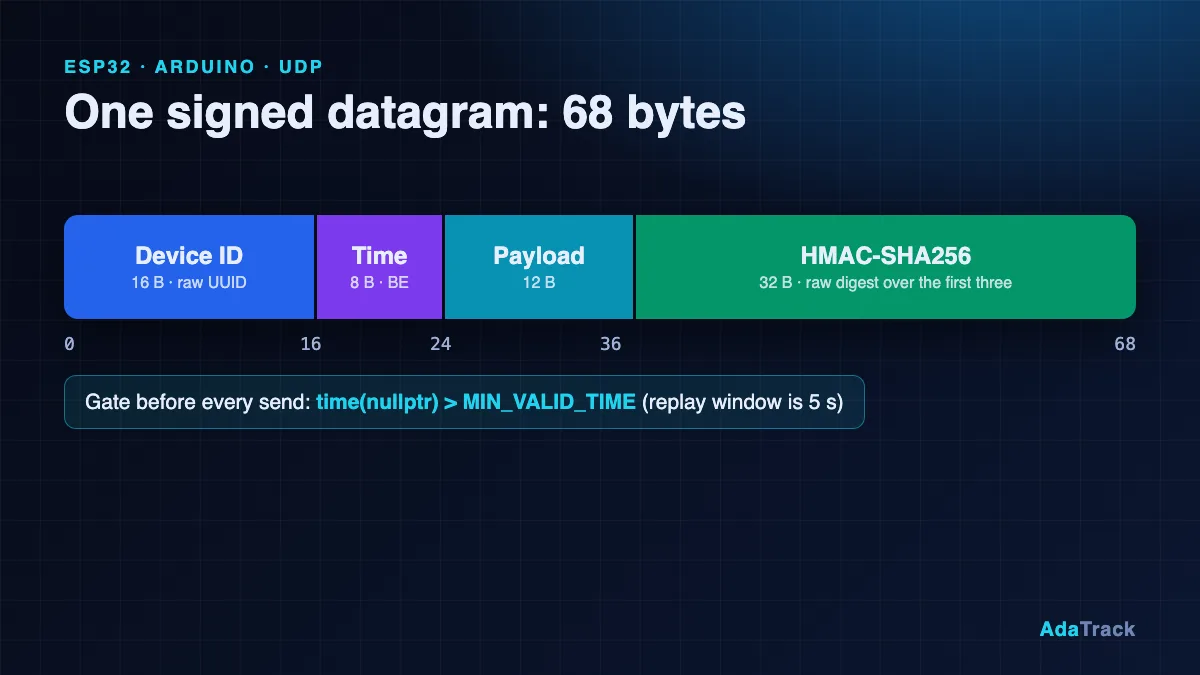
The install command walks operators through a complete fresh setup. Before touching a single table, it connects to the target PostgreSQL instance and runs a battery of pre-flight checks: PostgreSQL version compatibility (15+), availability of required extensions (TimescaleDB, PostGIS, uuid-ossp), table creation privileges, and connection pool headroom. On Linux hosts, it even inspects kernel-level UDP buffer sizes and open file limits — the same parameters that determine whether your ingestion layer can sustain thousands of packets per second without kernel-level drops.
Only after validation passes does the tool present its migration plan, display exactly what will be applied, and wait for confirmation. The --create-extensions flag handles extension installation automatically for environments where the operator has superuser access.
Upgrades, Rollbacks, and Schema Awareness
The upgrade command detects the current schema version via the schema_migrations table — the same mechanism used by our CI/CD pipeline and production deployments — and applies only the pending migrations. For environments that need to revert a change, the rollback command supports both step-count and target-version modes, with explicit warnings about potential data loss before execution.
The status command provides a read-only snapshot: current schema version, pending migration count, installed extension versions, hypertable configuration, and table count. It is a quick way to verify that an instance is healthy and up to date without running any mutations.
Backup, Restore, and the Doctor
The backup and restore commands wrap pg_dump and pg_restore with TimescaleDB-aware defaults — compressed custom format, proper pre/post restore hooks for hypertables, and an --exclude-readings flag for operators who want to back up configuration without the potentially massive telemetry hypertable.
The doctor command is perhaps the most operationally valuable addition. It runs a comprehensive health check across six categories: schema integrity, TimescaleDB chunk and compression status, storage utilization and table bloat, connection pool usage and long-running queries, cache hit ratios and index efficiency, and host-level kernel parameters. The --json flag makes it trivial to pipe diagnostics into monitoring systems like Prometheus Alertmanager or PagerDuty.
v1.0.1: Refinements from Real-World Deployments
Within days of the v1.0 release, feedback from early self-hosted adopters drove a rapid follow-up. The v1.0.1 patch addresses the practical friction points that emerged during real-world installations:
- Automatic environment loading:
adatrack-ctlnow reads/etc/default/adatrackand/opt/adatrack/config/.envon startup, eliminating the need to pass database credentials via flags or export them in the shell for every command. A new--env-fileflag allows explicit path overrides. - Correct binary installation path: The binary is now installed to
/usr/local/bin/with proper permissions, making it available system-wide without requiring the full path. - Deployment script fixes: Corrected project root detection and binary permissions in the deployment scripts, resolving issues with schema file copies and execute permissions on first install.
Design Philosophy: Explicit Over Magic
A deliberate design choice in adatrack-ctl is that it never auto-migrates on server startup. Every schema change is an explicit, operator-initiated action. You run the command, review the plan, and confirm. This may seem conservative for a developer tool, but in production IoT environments — where a bad migration can take down telemetry ingestion for an entire fleet — explicitness is a feature, not friction.
The same philosophy extends to uninstallation. The uninstall command requires typed confirmation of the database name (unless both --force and --yes are passed), and the rollback command surfaces clear data-loss warnings before execution. These are not arbitrary safety rails — they reflect hard-won lessons from operating high-throughput IoT systems in production.
Combined with --dry-run mode (which previews changes without executing them) and --verbose output (which shows every SQL statement being applied), adatrack-ctl gives operators complete visibility and control over their database lifecycle.