Python UDP Client Example: HMAC-SHA256 and struct
Published: | Category: Hardware
Searching for a Python UDP client example usually turns up a bare socket.sendto call. Searching for HMAC in Python turns up web-hook signatures. What is missing is the combination real devices need: pack binary telemetry with struct, sign the bytes with hmac, and send them over a socket. This tutorial is for developers and firmware engineers who want a working client in about 40 lines of standard-library Python, either as a simulator or as the reference to port to firmware. By the end you will send signed binary telemetry to AdaTrack and watch a device move on the map.
The excerpts below come from the complete script on the Python UDP client docs page, which has the full file and the argument parser.
What does a signed telemetry packet contain?
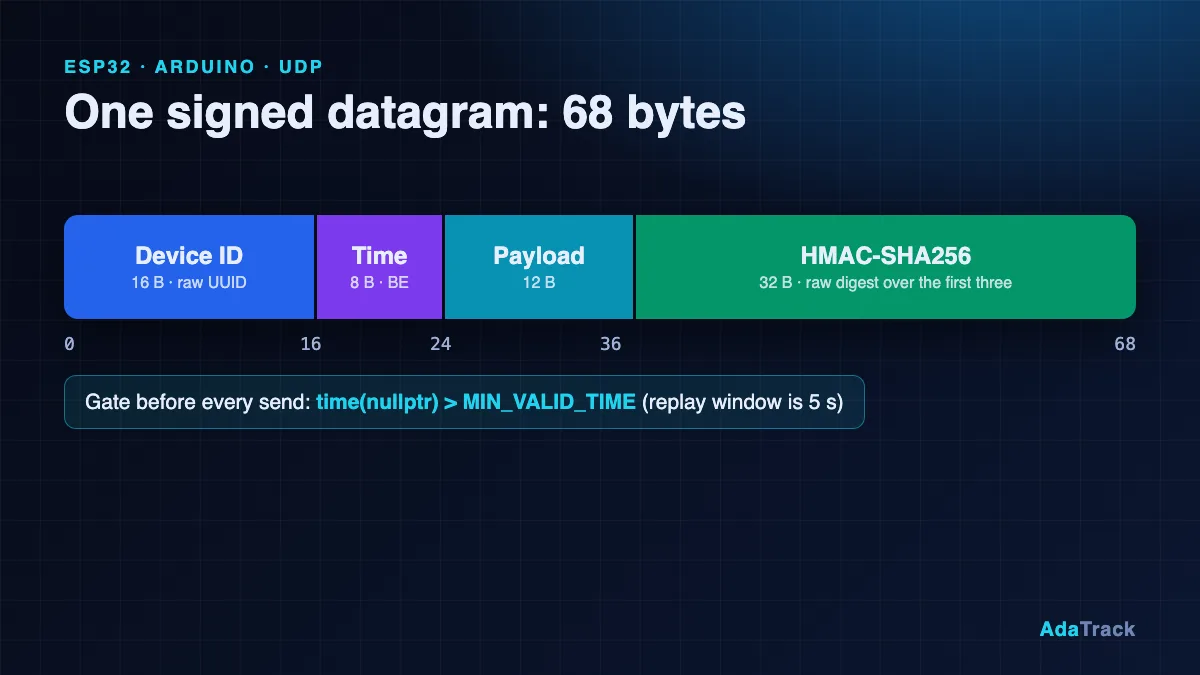
One UDP datagram, with every multi-byte integer big-endian:
| Offset | Size | Field |
|---|---|---|
| 0 | 16 B | Device ID, raw UUID bytes |
| 16 | 8 B | Timestamp, UNIX seconds UTC, uint64 big-endian |
| 24 | N B | Payload (12 B here) |
| 24 + N | 32 B | Raw HMAC-SHA256 over everything before it |
The server sends no response to telemetry. A bad signature, an old timestamp or an unknown device is dropped silently, so correctness has to be proven on the client side. For the security reasoning behind this design, see Securing IoT devices with HMAC and replay protection.
How do I pack a binary payload with struct.pack?
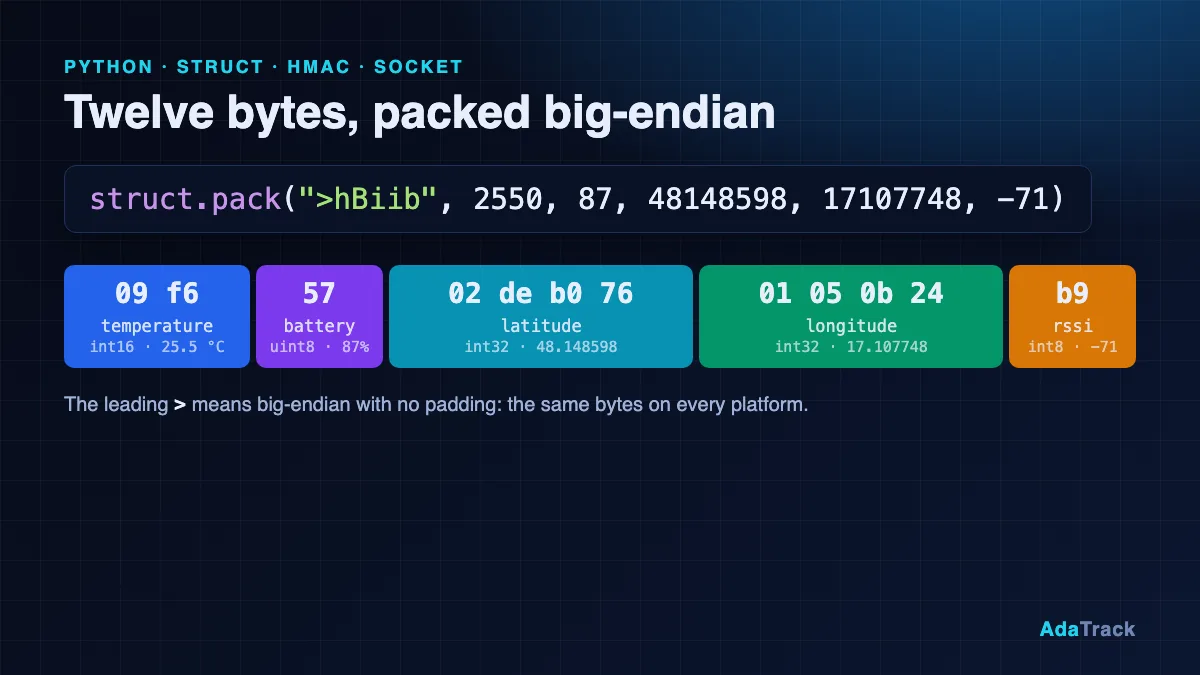
The payload is five fields: temperature in hundredths of a degree (int16), battery percent (uint8), latitude and longitude times one million (int32 each) and RSSI (int8). The struct pack binary payload format string is '>hBiib':
def build_payload(temp_c, battery, lat, lon, rssi):
    """12-byte big-endian payload that matches the tutorial decoder."""
    return struct.pack(
        ">hBiib",
        round(temp_c * 100),   # int16, centi-degrees C
        battery,               # uint8, percent
        round(lat * 1_000_000),  # int32, degrees * 1e6
        round(lon * 1_000_000),  # int32, degrees * 1e6
        rssi,                  # int8, dBm
    )
The leading > forces big-endian and disables padding, so the result is exactly 12 bytes regardless of platform. Values are rounded to integers (round(25.5 * 100) is 2550) so floating-point noise cannot change a byte. The matching decoder, pasted into a device profile, reads the same offsets (see custom payload decoders):
function Decoder(bytes, port) {
  if (bytes.length < 12) {
    throw new Error("payload too short: " + bytes.length);
  }
  var v = new DataView(new Uint8Array(bytes).buffer);
  return {
    temperature: v.getInt16(0) / 100,
    battery: v.getUint8(2),
    latitude: v.getInt32(3) / 1e6,
    longitude: v.getInt32(7) / 1e6,
    rssi: v.getInt8(11)
  };
}
How do I HMAC-sign a UDP packet in Python?
To HMAC sign a UDP packet, build the header, concatenate the payload, sign the whole thing and append the raw digest:
def build_packet(device_id, key, timestamp, payload):
    """DeviceID(16) || Timestamp(8, BE) || Payload(N) || HMAC-SHA256(32)."""
    header = device_id.bytes + struct.pack(">Q", timestamp)
    signature = hmac.new(key, header + payload, hashlib.sha256).digest()
    return header + payload + signature
Three details decide whether the server accepts it. device_id.bytes is the 16 raw bytes, not the dashed text. ">Q" writes the timestamp as 8 big-endian bytes of whole seconds. And .digest() appends 32 raw bytes, not the 64-character .hexdigest().
Is the HMAC key the hex text or the decoded bytes?
This is the most common Python socket HMAC bug. AdaTrack shows the secret as 64 hex characters, but the key is the 32 decoded bytes. The script decodes it with bytes.fromhex(args.key_hex); calling key.encode() on the text yields a different key and a signature the server rejects. Pass the key through an environment variable such as ADATRACK_DEVICE_KEY rather than writing it into a file you might commit.
How do I send the datagram with a Python socket?
Create an IPv4 datagram socket (ingestion is IPv4 only), build a packet per reading and call sendto once per datagram:
    device_id = uuid.UUID(args.device_id)
    key = bytes.fromhex(args.key_hex)   # 32 decoded bytes, NOT the hex text
    if len(key) != 32:
        p.error("key must be 64 hex characters (32 bytes)")

    sock = socket.socket(socket.AF_INET, socket.SOCK_DGRAM)  # IPv4 only
    addr = (args.host, args.port)

    lat, lon = 48.148598, 17.107748  # start point (Bratislava)
    packets = args.count if args.loop else 1
    for i in range(packets):
        payload = build_payload(25.5 + (i % 5) * 0.1, 87, lat, lon, -71)
        packet = build_packet(device_id, key, int(time.time()), payload)  # seconds
        sock.sendto(packet, addr)
        print(f"sent {len(packet)} bytes ({i + 1}/{packets}) lat={lat:.6f} lon={lon:.6f}")
Keep the total packet under roughly 1400 bytes; the server reads at most 1500 and a truncated packet fails verification. Do not wait for a reply: none ever comes, even on success.
How do I verify my signing code with a known-answer test?
Before you debug the network, prove the crypto offline. The idea is simple: fix every input (key, device ID, timestamp, payload), compute the signature once with a trusted implementation, and assert that your code reproduces it byte for byte. The script has this check built in:
def self_test():
    key = bytes.fromhex(
        "000102030405060708090a0b0c0d0e0f101112131415161718191a1b1c1d1e1f"
    )
    device_id = uuid.UUID("11111111-2222-3333-4444-555555555555")
    payload = build_payload(25.5, 87, 48.148598, 17.107748, -71)
    assert payload.hex() == "09f65702deb07601050b24b9", payload.hex()
    packet = build_packet(device_id, key, 1767225600, payload)
    assert packet[-32:].hex() == (
        "a2e613655deb66ca81d2c518efa899bf9afe1c7b42bb003d9e5c4ff4a7111706"
    ), packet[-32:].hex()
    assert len(packet) == 68
    print("self-test OK: signature matches the known-answer vector")
The key is 000102030405060708090a0b0c0d0e0f101112131415161718191a1b1c1d1e1f, the device is 11111111-2222-3333-4444-555555555555, the timestamp is 1767225600, and the expected signature is a2e613655deb66ca81d2c518efa899bf9afe1c7b42bb003d9e5c4ff4a7111706. If your port to another language prints something different, you can compare the intermediate hex values field by field. The vector uses a past timestamp, so a live server rejects it by design: it is for checking code, not for sending.
How do I run it against AdaTrack?
Register a device with transport UDP (create the profile with the decoder above first), then copy the Device ID and the secret key from the one-time recap screen:
export ADATRACK_DEVICE_KEY=YOUR_64_HEX_KEY

# one packet
python3 adatrack_client.py --device-id YOUR_DEVICE_UUID

# simulate a moving trip: 20 packets, one every 2 seconds
python3 adatrack_client.py --device-id YOUR_DEVICE_UUID --loop --count 20 --interval 2
Open the Devices page to see a fresh last-seen time and the latest values, then the map: with --loop the marker steps north-east about 45 m per packet. For a self-hosted server, pass --host and --port; see self-hosted GPS tracking. If nothing appears, check the decoder in the Decoder Playground: latitude and longitude must be numbers.
Why is my Python UDP packet not accepted? Common mistakes
- Key as text:
key.encode()instead ofbytes.fromhex(...)givesinvalid_signature. - Little-endian timestamp:
"<Q"instead of">Q"makes the time look far in the past or future. - Milliseconds:
time.time() * 1000instead ofint(time.time())is dropped as a replay. - Clock skew: the window is 5 seconds in both directions, so sync with NTP.
- Hex digest:
.hexdigest()instead of.digest()breaks the signature. - Native-endian struct: omit the
>and you get padding and the wrong byte order; the decoder then returns garbage.
Self-hosted operators can read the Security: lines in the server log and the hmac_verification_failures_total metric to see the exact reason a packet was dropped.
What was tested
The script on the docs page was run unmodified with Python 3.13 against a local UDP receiver that implements the server's checks (minimum 56 bytes, big-endian timestamp, HMAC over Device ID, timestamp and payload, 5-second window, payload decoding). A single packet and a --loop --count 2 run were accepted and decoded to the expected values, and --self-test passed. It was not run against the production ingest.adatrack.io service for this article.
FAQ
Do I need any third-party packages?
No. socket, struct, hmac, hashlib, uuid and time are all in the Python standard library (3.8 or newer).
Why does sendto succeed even when the signature is wrong?
UDP has no delivery feedback and AdaTrack never replies to telemetry, so a rejected packet looks identical to an accepted one on the client.
Can I use the same struct format for my own payload?
Yes. The platform treats the payload as opaque bytes. Change the struct format and the decoder's DataView reads together, and keep the big-endian > prefix.
What port and host should I use?
ingest.adatrack.io, UDP port 9000 for the SaaS service. Self-hosted installs use their own host and UDP_PORT.
Can I port this to a microcontroller?
Yes, that is the point of the known-answer test. See the sibling tutorial on sending signed UDP packets from an ESP32.
Next steps
The full script with argument parsing and the longer troubleshooting notes is in the Python UDP client documentation. For the wider platform, see the AdaTrack features.