Send a UDP Packet from ESP32 with HMAC-SHA256 (Arduino)
Published: | Category: Hardware
If you want to send a UDP packet from ESP32 to a tracking platform and have it show up on a live map, the code is short but unforgiving: one wrong byte and the server drops the packet without a word. This tutorial is for developers with an ESP32 (or any Arduino-compatible board) on the desk. By the end you will have an ESP32 GPS tracker skeleton that builds a 68-byte signed packet, waits for the clock, sends it with WiFiUDP and appears as a moving device in AdaTrack.
We show the key excerpts here. The complete, copy-pasteable sketch lives in the Arduino and ESP32 docs page.
Why send telemetry over UDP instead of HTTP or MQTT?
A tracker that wakes up, reads a position and goes back to sleep wants the cheapest possible transmission. UDP has no handshake, no connection state and no TLS negotiation, so a reading costs one datagram of a few dozen bytes. The trade-off is that UDP gives you no delivery feedback and carries no authentication of its own. AdaTrack closes that gap by putting the proof of authenticity inside every packet with HMAC-SHA256 and a timestamp. We explain the design in Securing IoT devices with HMAC and replay protection.
The practical consequence: the server never replies to telemetry. A bad signature, a stale timestamp, an unknown device or an exhausted quota all result in a silent drop. From the sketch, a rejected packet looks exactly like an accepted one. That is why the three gotchas below matter so much.
What does the 68-byte signed packet look like?
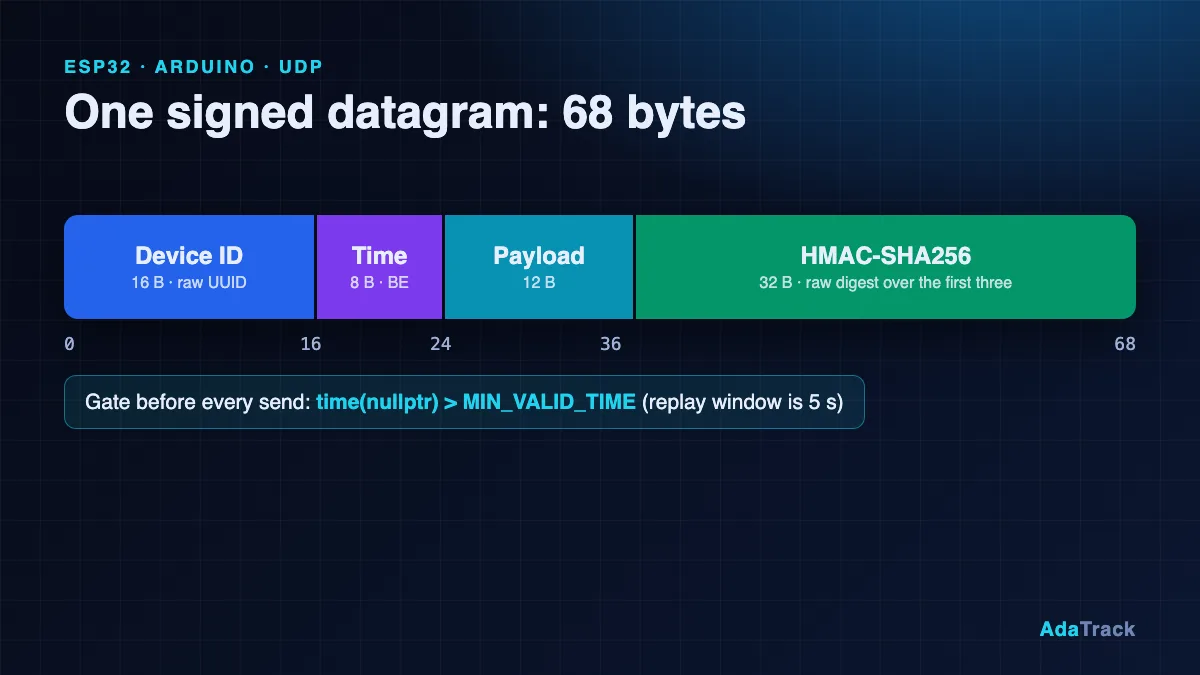
One datagram, all multi-byte integers big-endian:
| Offset | Size | Field |
|---|---|---|
| 0 | 16 B | Device ID, the raw UUID bytes |
| 16 | 8 B | Timestamp, UNIX seconds UTC, uint64 big-endian |
| 24 | N B | Payload, 12 bytes in this example |
| 24 + N | 32 B | HMAC-SHA256 of everything before it, raw bytes (not hex) |
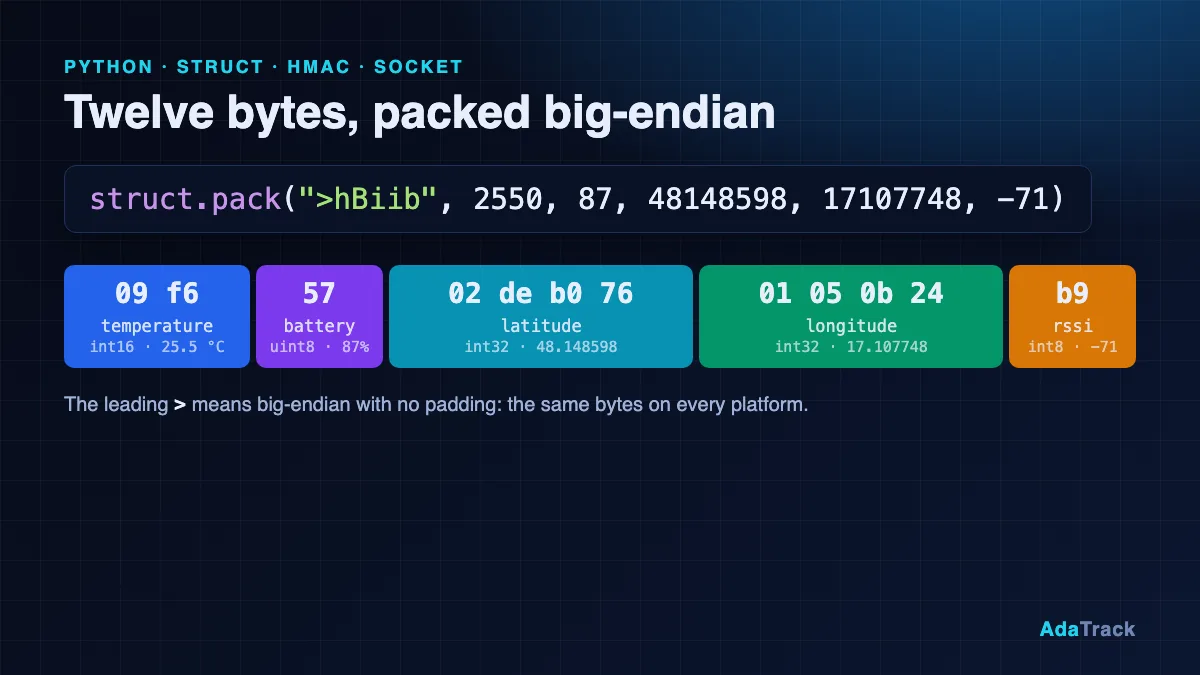
With a 12-byte payload that is 16 + 8 + 12 + 32 = 68 bytes. The payload is opaque to the platform: a JavaScript decoder in your device profile turns it into fields. Ours carries temperature, battery, latitude, longitude and RSSI:
function Decoder(bytes, port) {
  if (bytes.length < 12) {
    throw new Error("payload too short: " + bytes.length);
  }
  var v = new DataView(new Uint8Array(bytes).buffer);
  return {
    temperature: v.getInt16(0) / 100,
    battery: v.getUint8(2),
    latitude: v.getInt32(3) / 1e6,
    longitude: v.getInt32(7) / 1e6,
    rssi: v.getInt8(11)
  };
}
Create a device profile with this decoder, register a device with transport UDP, and copy the Device ID (a UUID) and the 64-character secret key from the recap screen. The key is shown once. The decoder entry point must be named Decoder, and latitude and longitude must be numbers, not strings, or the map ignores them. More on decoders in writing custom payload decoders.
Why are my ESP32 packets silently dropped? Gotcha 1: wait for NTP
The server rejects any packet whose timestamp differs from its own clock by more than 5 seconds, in either direction, and it checks this before the signature. A freshly booted ESP32 reports a time around 1970 until SNTP finishes, so every packet sent too early is dropped. The fix is to refuse to send until the clock is plausible:
static bool waitForTime(uint32_t timeoutMs) {
  uint32_t t0 = millis();
  while (time(nullptr) < MIN_VALID_TIME) {
    if (millis() - t0 > timeoutMs) return false;
    delay(200);
  }
  return true;
}
In setup() the sketch starts SNTP in UTC (no timezone offsets, the protocol wants UTC seconds) and blocks until the time is valid:
  // SNTP keeps running in the background and re-syncs periodically.
  configTime(0, 0, "pool.ntp.org", "time.google.com");   // UTC; no offsets needed
  Serial.print("waiting for NTP");
  while (!waitForTime(30000)) Serial.print(" (retrying)");
  Serial.printf("\ntime = %lld\n", (long long)time(nullptr));
The main loop also checks time(nullptr) < MIN_VALID_TIME before every send, so a lost NTP sync never leads to stale timestamps.
Gotcha 2: why not memcpy a struct into the packet?
It is tempting to define a C struct and copy it into the buffer. Don't. Compilers insert padding, and the ESP32 is little-endian while the protocol is big-endian. Write every byte explicitly instead. These helpers build the 12-byte payload with scaled integers (degrees times 1e6 fit in a signed 32-bit value, so negative coordinates need no special handling):
static size_t putBE16(uint8_t *p, uint16_t v) { p[0] = v >> 8; p[1] = v; return 2; }
static size_t putBE32(uint8_t *p, uint32_t v) {
  p[0] = v >> 24; p[1] = v >> 16; p[2] = v >> 8; p[3] = v;
  return 4;
}
static size_t putBE64(uint8_t *p, uint64_t v) {
  for (int i = 0; i < 8; i++) p[i] = (uint8_t)(v >> (56 - 8 * i));
  return 8;
}

// 12-byte Tutorial Tracker payload.
static size_t buildPayload(uint8_t *p, float tempC, uint8_t battery,
                           double lat, double lon, int8_t rssi) {
  size_t n = 0;
  n += putBE16(p + n, (uint16_t)(int16_t)lroundf(tempC * 100.0f));
  p[n++] = battery;
  n += putBE32(p + n, (uint32_t)(int32_t)lround(lat * 1e6));
  n += putBE32(p + n, (uint32_t)(int32_t)lround(lon * 1e6));
  p[n++] = (uint8_t)rssi;
  return n;
}
The identical layout comes out on every compiler and CPU, and the timestamp goes through putBE64 the same way.
Gotcha 3: is the HMAC key the hex text or the decoded bytes?
AdaTrack shows the key as 64 hex characters, but the HMAC key is the 32 decoded bytes. Using the ASCII text of the hex string produces a perfectly valid-looking signature that the server will reject as invalid_signature. The sketch converts the text once at boot:
// Converts exactly outLen bytes from a hex string. Returns false on any bad
// character or wrong length.
static bool hexToBytes(const char *hex, uint8_t *out, size_t outLen) {
  for (size_t i = 0; i < outLen; i++) {
    int hi = hexNibble(hex[2 * i]);
    if (hi < 0) return false;
    int lo = hexNibble(hex[2 * i + 1]);
    if (lo < 0) return false;
    out[i] = (uint8_t)((hi << 4) | lo);
  }
  return hex[2 * outLen] == '\0';
}
and calls it with hexToBytes(SECRET_KEY_HEX, secretKey, 32) in setup(). Never commit the real key; use placeholders such as YOUR_64_HEX_KEY in code you share.
How do I compute HMAC-SHA256 on the ESP32 with mbedTLS?
The ESP32 Arduino core bundles mbedTLS, so ESP32 HMAC SHA256 needs no extra library. The one-shot mbedtls_md_hmac helper signs the buffer in place, right after the header and payload:
// ---- HMAC (mbedTLS) ----
// mbedtls_md_hmac() is a one-shot helper available in mbedTLS 2.x and 3.x.
static bool hmacSha256(const uint8_t *key, size_t keyLen,
                       const uint8_t *data, size_t dataLen, uint8_t *out32) {
  const mbedtls_md_info_t *info = mbedtls_md_info_from_type(MBEDTLS_MD_SHA256);
  if (info == NULL) return false;
  return mbedtls_md_hmac(info, key, keyLen, data, dataLen, out32) == 0;
}

// Builds [DeviceID][Timestamp][Payload][HMAC]. Returns total length, 0 on error.
static size_t buildPacket(uint8_t *buf, size_t cap, const uint8_t *id,
                          const uint8_t *key, uint64_t ts,
                          const uint8_t *payload, size_t plen) {
  if (24 + plen + 32 > cap) return 0;
  size_t n = 0;
  for (int i = 0; i < 16; i++) buf[n++] = id[i];
  n += putBE64(buf + n, ts);
  for (size_t i = 0; i < plen; i++) buf[n++] = payload[i];
  if (!hmacSha256(key, 32, buf, n, buf + n)) return 0;
  return n + 32;
}
The signature is appended as raw bytes. Appending a hex string is another common cause of invalid_signature.
How do I send the packet with WiFiUDP and check for errors?
The WiFiUDP calls report failure through their return values, and ignoring them hides DNS and socket problems. The sketch checks beginPacket, the byte count from write and endPacket:
  uint8_t payload[12], packet[24 + 12 + 32];
  size_t plen = buildPayload(payload, tempC, battery, lat, lon, rssi);
  size_t n = buildPacket(packet, sizeof(packet), deviceId, secretKey,
                         (uint64_t)time(nullptr), payload, plen);
  if (n == 0) { Serial.println("build failed"); return; }

  if (!udp.beginPacket(serverIp, SERVER_PORT)) {   // returns 0 on failure
    Serial.println("beginPacket failed");
    haveIp = false;                                // force a DNS refresh
    return;
  }
  size_t written = udp.write(packet, n);
  if (!udp.endPacket() || written != n) {          // returns 0 on failure
    Serial.println("endPacket failed");
    return;
  }
  Serial.printf("sent %u bytes\n", (unsigned)n);
}
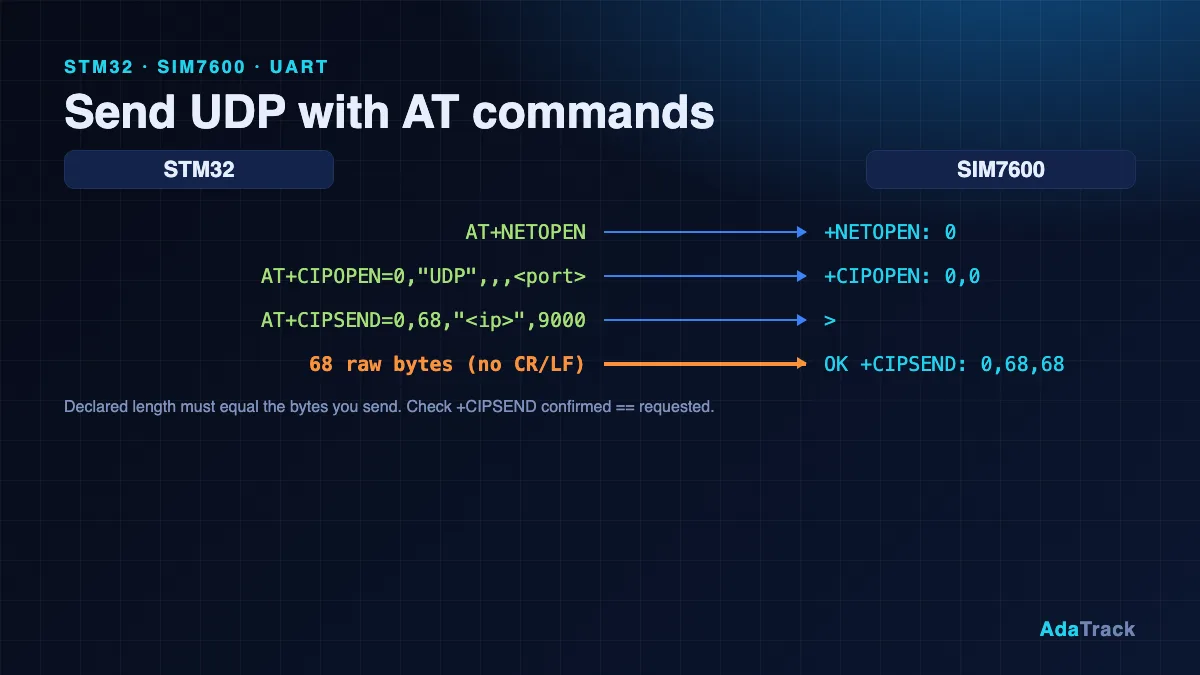
A successful sent 68 bytes only means the datagram left the board. It says nothing about acceptance, because the server stays silent either way.
How do I prove the signing code is correct before touching the network?
Use a known-answer test. With the key 000102030405060708090a0b0c0d0e0f101112131415161718191a1b1c1d1e1f, device ID 11111111-2222-3333-4444-555555555555, timestamp 1767225600 and payload 09f65702deb07601050b24b9, the signature must be a2e613655deb66ca81d2c518efa899bf9afe1c7b42bb003d9e5c4ff4a7111706. The full sketch runs this check at boot (it prints SELFTEST OK and refuses to send otherwise). The vector uses a fixed past timestamp, so a live server rejects it by design; it exists only to check your code.
How do I confirm the data on the live map?
Open the Devices page: the device should show a recent last-seen time and the latest temperature, battery and RSSI. Open the map and the marker appears at the decoded coordinates. The sketch sends fixed coordinates by default; for a real ESP32 GPS tracker, the docs page shows how to feed a GPS module through TinyGPSPlus and only report fresh fixes. If nothing shows, paste the payload hex into the Decoder Playground and make sure latitude and longitude come back as numbers. Self-hosted operators can read the Security: lines in the server log and the hmac_verification_failures_total metric to see exactly why packets were dropped.
What was tested
We want to be exact here. The author could not run this on hardware. The pure packet-building functions (hex parsing, big-endian helpers, payload and packet builders) were extracted from the sketch and compiled on a host computer, with HMAC backed by OpenSSL; the 68-byte packet they produced matched the known-answer packet exactly. The mbedtls_md_hmac call was compiled only against a small stand-in header with the same signature, so check mbedtls/md.h in your core if it does not compile. The WiFi, WiFiUDP and SNTP behavior on a real ESP32 has not been tested. If you run it on a board, make the boot self-test pass first.
FAQ
Does AdaTrack send a response to my ESP32?
No. Telemetry is fire-and-forget, and rejected packets are dropped silently. Confirm arrival on the Devices page or the map.
Which UDP port and host do I use?
The SaaS endpoint is ingest.adatrack.io on UDP port 9000. Self-hosted installs use your own host and the UDP_PORT setting, default 9000. Ingestion is IPv4 only.
Does this work on an ESP8266?
The packet code is identical; only the Wi-Fi header, sleep setting and HMAC call change. The docs page lists the differences, including an untested BearSSL variant.
How accurate must the ESP32 clock be?
Within 5 seconds of real UTC, in both directions. NTP over Wi-Fi is plenty; cellular trackers can use network time or a GPS module.
Why does my packet fail even though NTP works?
Check the other two gotchas: the key must be the decoded bytes, and the timestamp and payload must be big-endian. Run the known-answer self-test.
Next steps
Get the full sketch, the ESP8266 and AVR notes and the troubleshooting table in the Arduino and ESP32 documentation. If you want to validate your device profile from a laptop first, read the sibling tutorial, Python UDP client with HMAC-SHA256 and struct.