STM32 + SIM7600: Send UDP with AT Commands (AT+CIPOPEN)
Published: | Category: Hardware
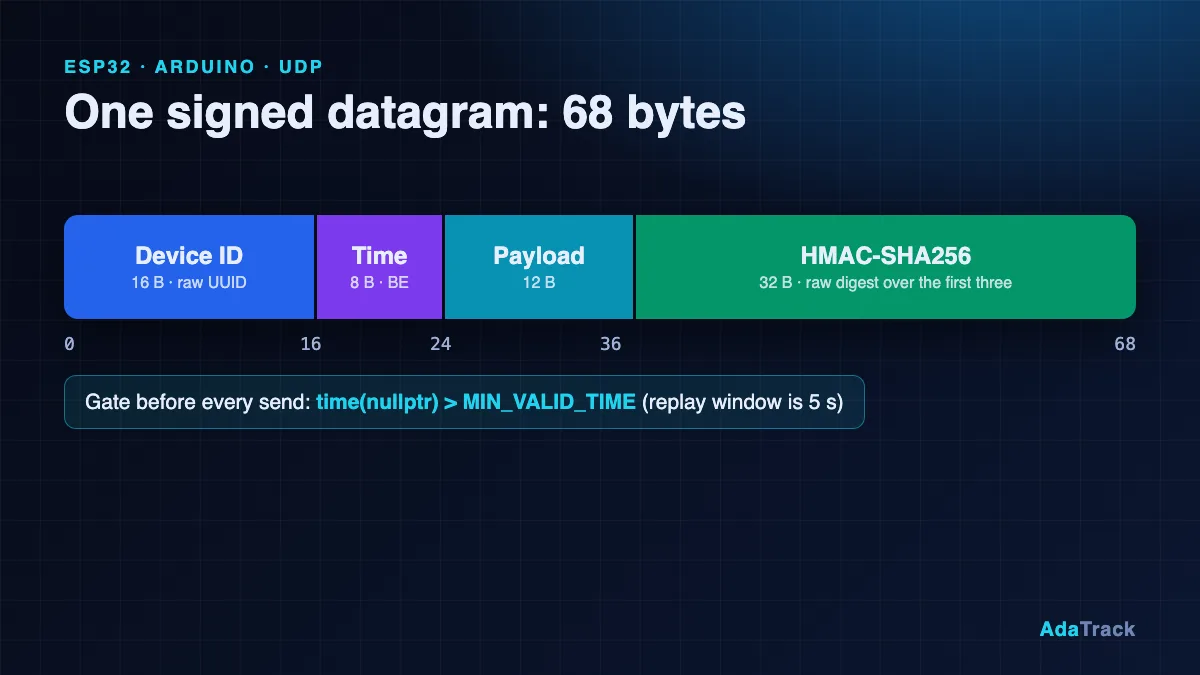
Most STM32 SIM7600 UDP AT commands material is a vendor PDF: correct, but a list of commands without the three or four things that make a real tracker work. This tutorial is for firmware engineers who have an STM32 and a SIMCom SIM7600 (or SIM7500/SIM7800) on the desk and want a STM32 GPS tracker cellular link that sends signed binary telemetry to AdaTrack. By the end you will know the exact AT sequence, the code that builds and sends a 68-byte signed datagram, and why packets get dropped silently when any one detail is off.
We show the key excerpts here. The complete, copy-pasteable drivers (HAL UART with DMA, bring-up, time parsing) are on the STM32 docs page; the other firmware examples are listed in the firmware documentation hub.
Why send UDP over a cellular modem instead of HTTP or MQTT?
Every cellular byte costs data-plan money and battery. HTTPS or MQTT over TLS needs a TCP handshake, a TLS handshake and keep-alives before the first reading leaves the device. UDP is one datagram: a 68-byte packet carries a full reading. The SIM7600 has its own TCP/IP stack behind AT+NET... and AT+CIP... commands, so the STM32 needs no PPP and no lwIP for the cellular variant; it only talks AT over a UART.
UDP has no delivery feedback and no authentication of its own, so AdaTrack puts HMAC-SHA256 and a timestamp inside every packet; the reasoning is in Securing IoT devices with HMAC and replay protection. For when MQTT or HTTP is the better choice, see UDP vs MQTT vs HTTP for a GPS tracker. The consequence for your firmware: the server never answers telemetry, and a bad signature, stale timestamp, unknown device or exhausted quota is a silent drop.
What is the AT command sequence to send UDP with a SIM7600?
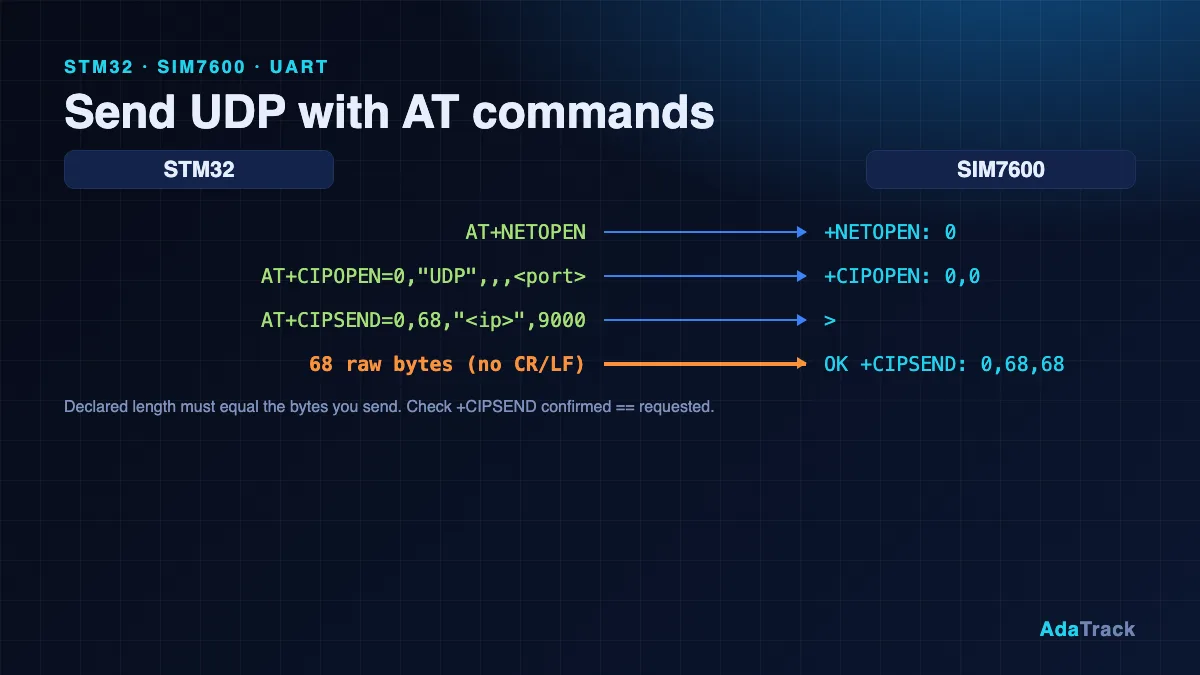
These are SIMCom commands, not Espressif ESP-AT and not SIM800 syntax; do not copy AT+CIPSTART examples from other families. The sequence below uses the module's built-in stack, taken from the SIMCom AT Command Manual (V3.00) and TCPIP Application Note (V2.00):
| Step | Command | Expected reply | Notes |
|---|---|---|---|
| 1 | AT | OK | Repeat until the modem answers after power-on |
| 2 | ATE0 | OK | Disable echo |
| 3 | AT+CPIN? | +CPIN: READY | SIM unlocked |
| 4 | AT+CEREG? (or CGREG?, CREG?) | +CEREG: <n>,<stat> | stat 1 (home) or 5 (roaming) means registered |
| 5 | AT+CGDCONT=1,"IP","<APN>" | OK | APN differs per carrier and SIM |
| 6 | AT+NETOPEN | OK, then +NETOPEN: 0 | Starts the TCP/IP service, up to 120 s; must precede socket commands |
| 7 | AT+CDNSGIP="<host>" | +CDNSGIP: 1,"<host>","<ip>" | Resolve once; UDP CIPSEND takes a dotted address |
| 8 | AT+CIPOPEN=0,"UDP",,,<local_port> | +CIPOPEN: 0,0 | Link 0 as a UDP socket; note the two empty fields |
| 9 | AT+CIPSEND=0,<len>,"<ip>",<port> | > | Wait for the prompt |
| 10 | exactly <len> raw bytes | OK, then +CIPSEND: 0,<req>,<cnf> | Success when req == cnf; no trailing CR or Ctrl+Z |
Shut down or recover with AT+CIPCLOSE=0 and AT+NETCLOSE. The docs page also lists AT+CSOCKSETPN=1 after the APN step. It appears in the V1.10 manual but not in the V3.00 text we checked, so the code ignores its result; check your firmware's AT manual.
The bring-up in code issues these commands in order, each with the timeout the manual gives (AT+NETOPEN gets 120 seconds):
    snprintf(cmd, sizeof cmd, "AT+CGDCONT=1,\"IP\",\"%s\"", APN);
    if (at_cmd(cmd, "OK", 1000) != AT_OK) return -4;
    at_cmd("AT+CSOCKSETPN=1", "OK", 1000);               /* socket service uses PDP profile 1 */

    at_result_t r = at_cmd("AT+NETOPEN", "+NETOPEN:", 120000);
    if (r != AT_OK) {
        /* "+IPERROR: Network is already opened" lands here too: treat as success. */
        if (!strstr(at_resp, "already opened")) return -5;
    } else if (urc_last_int("+NETOPEN:", -1) != 0) {
        return -5;                                       /* +NETOPEN: <err> != 0 */
    }
Then the UDP socket on link 0 and local port 40000 (the UDP form has no remote address; it is given per send):
    snprintf(cmd, sizeof cmd, "AT+CIPOPEN=%d,\"UDP\",,,%d", LINK, LOCAL_PORT);
    if (at_cmd(cmd, "+CIPOPEN:", 10000) != AT_OK) return -7;
    if (urc_last_int("+CIPOPEN:", -1) != 0) return -7;   /* "+CIPOPEN: 0,<err>" */
Why are my STM32 packets silently dropped? Gotcha 1: modem time and the replay window
The server rejects any timestamp more than 5 seconds from its own clock, in both directions, before it even checks the signature. A modem has no NTP by default, but it can learn the time from the network: AT+CCLK? returns +CCLK: "yy/MM/dd,hh:mm:ss±zz". Two traps:
- It is local time, and
±zzis the offset to GMT in quarters of an hour. The manual's example08/05/06,14:28:10+32is 14:28:10 at GMT+8. So UTC = local time minus zz x 15 minutes. - The network must actually send the time (NITZ, enabled by
AT+CTZU=1, the default). Not every carrier does. A date far in the past, or a reply without a zone suffix, means time is not available, and the device must send nothing.
The parser refuses a reply without a zone and converts with the standard integer calendar algorithm, so no mktime or time-zone database is needed:
int cclk_to_unix(const char *reply, int64_t *unix_utc)
{
    const char *p = strstr(reply, "+CCLK:");
    if (!p) return -1;
    p += 6;
    while (*p == ' ') p++;
    if (expect_char(&p, '"') < 0) return -1;

    int yy = digits(&p, 2);       if (yy < 0 || expect_char(&p, '/') < 0) return -1;
    int mo = digits(&p, 2);       if (mo < 0 || expect_char(&p, '/') < 0) return -1;
    int dd = digits(&p, 2);       if (dd < 0 || expect_char(&p, ',') < 0) return -1;
    int hh = digits(&p, 2);       if (hh < 0 || expect_char(&p, ':') < 0) return -1;
    int mi = digits(&p, 2);       if (mi < 0 || expect_char(&p, ':') < 0) return -1;
    int ss = digits(&p, 2);       if (ss < 0) return -1;

    /* The zone suffix is mandatory here: the manual says the stored zone can be
     * "invalid" (factory state), and then the reply carries no zone. Without
     * it we cannot convert local time to UTC, so report failure. */
    if (*p != '+' && *p != '-') return -1;
    int neg = (*p == '-');
    p++;
    int z = digits(&p, 2);
    if (z < 0) return -1;
    int zone_q = neg ? -z : z;
    if (expect_char(&p, '"') < 0) return -1;

    if (mo < 1 || mo > 12 || dd < 1 || dd > 31 || hh > 23 || mi > 59 || ss > 60)
        return -1;

    int64_t days = days_from_civil(2000 + yy, (unsigned)mo, (unsigned)dd);
    int64_t local = days * 86400 + hh * 3600 + mi * 60 + ss;
    /* zone = (local - UTC) in 15-minute units, so UTC = local - zone*900. */
    *unix_utc = local - (int64_t)zone_q * 900;
    return 0;
}
The main loop also requires the result to be after a floor constant (2026-01-01 in the example) and resynchronises periodically. Alternatives are the module's AT+CNTP NTP command or GNSS time from AT+CGPSINFO, which is already UTC; the docs page covers both, but we did not verify AT+CNTP preconditions.
Gotcha 2: why not memcpy a struct on a Cortex-M?
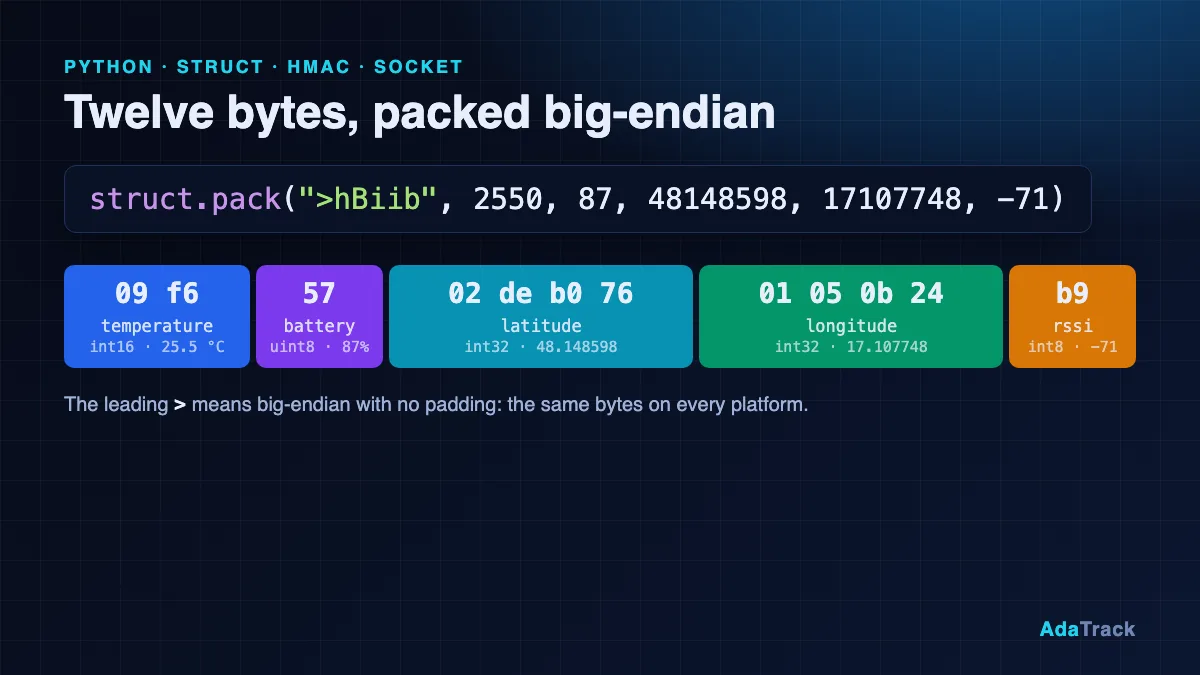
Cortex-M cores are little-endian; the timestamp and every multi-byte payload field must be big-endian. A packed struct copied with memcpy puts the low byte first, and because the HMAC is computed over the same wrong bytes it still verifies, so the mistake only shows up as nonsense in the decoder output. The packet builder writes every byte explicitly and signs in place:
size_t adatrack_build_packet(uint8_t *out, size_t out_cap,
                             const uint8_t device_id[ADATRACK_ID_LEN],
                             uint64_t unix_seconds,
                             const uint8_t *payload, size_t payload_len,
                             const uint8_t *key, size_t key_len)
{
    size_t signed_len = ADATRACK_ID_LEN + ADATRACK_TS_LEN + payload_len;
    size_t total = signed_len + ADATRACK_HMAC_LEN;
    if (total > out_cap) return 0;

    for (size_t i = 0; i < ADATRACK_ID_LEN; i++) out[i] = device_id[i];
    put_be64(out + ADATRACK_ID_LEN, unix_seconds);
    for (size_t i = 0; i < payload_len; i++)
        out[ADATRACK_ID_LEN + ADATRACK_TS_LEN + i] = payload[i];

    /* The signature covers everything written so far, in place. */
    if (adatrack_hmac_sha256(key, key_len, out, signed_len, out + signed_len) != 0)
        return 0;
    return total;
}
The payload is the 12-byte tracker layout (temperature, battery, latitude, longitude, RSSI); casting a negative int32_t to uint32_t before shifting yields the right two's-complement bytes. The matching decoder and the 68-byte layout are on the docs page and in the ESP32 tutorial, which uses the identical packet.
Gotcha 3: is the HMAC key the hex text or the decoded bytes?
AdaTrack shows the key as 64 hex characters, but the HMAC key is the 32 decoded bytes. Signing with the ASCII text gives a plausible signature that the server rejects as invalid_signature. Decode once at provisioning time (a UUID string with dashes also works for the Device ID):
uint8_t device_id[16], key[32];
hex_to_bytes("YOUR_DEVICE_UUID", device_id, sizeof device_id);   /* 16 */
hex_to_bytes("YOUR_64_HEX_KEY",  key,       sizeof key);         /* 32 */
Use placeholders in code you share and never commit a real key. For production, keep it out of readable flash. HMAC itself is a thin wrapper around mbedtls_md_hmac(); the Python equivalent is in the Python UDP client tutorial.
Gotcha 4: why does AT+CIPSEND not succeed?
The length in AT+CIPSEND=0,<len>,... must equal the number of raw bytes you send afterwards (the manual allows 1 to 1500). Send the bytes only after the > prompt, with no trailing carriage return and no Ctrl+Z when the length is given. Then read the +CIPSEND: 0,<req>,<cnf> line: req and cnf must both equal your length. A cnf of -1 means the connection is gone, and 0 means the module's send buffer is full; if they differ, the manual says to close and reopen the socket. This is the whole send sequence:
int modem_udp_send(const uint8_t *data, size_t len)
{
    char cmd[80];
    snprintf(cmd, sizeof cmd, "AT+CIPSEND=%d,%u,\"%s\",%d",
             LINK, (unsigned)len, server_ip, SERVER_PORT);
    if (at_cmd(cmd, ">", 5000) != AT_OK) return -1;
    HAL_UART_Transmit(MODEM_UART, data, (uint16_t)len, 1000);   /* raw bytes, no CR, no Ctrl+Z */
    if (at_wait("+CIPSEND:", 10000) != AT_OK) return -2;
    int l, req, cnf;
    if (cipsend_parse(at_resp, &l, &req, &cnf) != 0) return -3;
    return (req == (int)len && cnf == (int)len) ? 0 : -4;       /* cnf -1/0: socket unusable, reopen */
}
Keep the datagram under about 1400 bytes: the server reads at most 1500 and a truncated packet fails the HMAC.
What about STM32 lwIP over Ethernet?
With a wired Nucleo board the same packet goes out through the raw lwIP UDP API instead of a modem. The rules that matter: create the pcb once with udp_new() (and check for NULL) rather than removing and recreating it per packet, which fragments the heap and rebinds a new source port each time:
    LOCK_TCPIP_CORE();
    g_pcb = udp_new();                              /* ONCE. NULL means out of memory. */
    if (g_pcb == NULL) { UNLOCK_TCPIP_CORE(); return -3; }
    e = udp_connect(g_pcb, &g_server_ip, SERVER_PORT);   /* also binds an ephemeral local port */
    UNLOCK_TCPIP_CORE();
    return (e == ERR_OK) ? 0 : -4;
Then per send, allocate a PBUF_RAM pbuf, copy the packet in, send, and always free the pbuf, because udp_send() does not take ownership:
int adatrack_udp_send(const uint8_t *pkt, uint16_t len)
{
    struct pbuf *p = pbuf_alloc(PBUF_TRANSPORT, len, PBUF_RAM);
    if (p == NULL) return -1;
    if (pbuf_take(p, pkt, len) != ERR_OK) { pbuf_free(p); return -2; }

    LOCK_TCPIP_CORE();
    err_t e = udp_send(g_pcb, p);                   /* does NOT take ownership of p */
    UNLOCK_TCPIP_CORE();

    pbuf_free(p);                                   /* always free, success or not */
    return (e == ERR_OK) ? 0 : -3;
}
The raw API is not thread-safe from application tasks; the docs page explains core locking versus tcpip_callback(), SNTP for time and the full file in Part A of the STM32 page.
How do I prove the signing code is correct before using the modem?
Use the known-answer vector: key 000102030405060708090a0b0c0d0e0f101112131415161718191a1b1c1d1e1f, device ID 11111111-2222-3333-4444-555555555555, timestamp 1767225600 and payload 09f65702deb07601050b24b9 must give the signature a2e613655deb66ca81d2c518efa899bf9afe1c7b42bb003d9e5c4ff4a7111706. The timestamp is in the past, so a live server rejects it by design; it only checks your code. Once it matches, register a UDP device with the tutorial decoder, copy the Device ID and key from the one-time recap screen, and watch the Devices page and the map. Self-hosted operators can follow the Security: log lines and the hmac_verification_failures_total metric; see self-hosted GPS tracking.
What was tested
We want to be exact. Nothing was run on an STM32 board, a SIM7600 module or a real network. The pure C logic was compiled on a host with warnings and sanitizers and reproduced the 68-byte known-answer packet exactly, with HMAC from OpenSSL and separately from mbedTLS 3.6.0 built from source. The AT+CCLK? parser was compared with Python on more than 300 cases (leap days, zones from -47 to +48 quarter-hours, malformed input) with no mismatches. The modem driver logic ran against a scripted fake modem that answers in the format shown in the SIMCom manual, and the bytes it transmitted matched the packet. The lwIP code was only syntax-checked against the lwIP 2.2.0 headers, never linked or run, and the HAL calls were compiled against hand-written stubs, so DMA and idle-line behavior is unexercised. Real firmware may format replies differently (for example spacing after the colon), so capture your own modem's output once.
FAQ
How do I send UDP with a SIM7600?
Register on the network, define the APN with AT+CGDCONT, start the stack with AT+NETOPEN, open a UDP link with AT+CIPOPEN=0,"UDP",,,<local_port>, then use AT+CIPSEND=0,<len>,"<ip>",<port>, wait for > and send exactly that many raw bytes.
Why does AT+CIPSEND fail or return a mismatched count?
Check that the length matches the bytes sent, that you waited for the > prompt, and the +CIPSEND reply: cnf of -1 or 0, or req not equal to cnf, means the socket should be closed and reopened (and often the data session was dropped).
Do I need NTP with a modem?
Not necessarily. The network time from AT+CCLK? works if your carrier sends it, as long as you convert local time to UTC with the zone in quarter-hours. The clock must be within 5 seconds of UTC, so resynchronise periodically and send nothing while time is invalid.
Does SIM800 use the same commands?
We have not verified that. The command names look similar but the syntax differs between families, so use the AT manual for your exact module and firmware revision.
Which host and port do I send to?
ingest.adatrack.io, UDP port 9000 for the SaaS service. Self-hosted installs use their own host and UDP_PORT. Ingestion is IPv4 only, and the modem resolves the name with AT+CDNSGIP.
Next steps
Get the full HAL UART driver, GNSS parsing, carrier NAT notes and the lwIP file in the STM32 documentation. See the rest of the platform on the AdaTrack features page.